July 13, 2026 · 7 min read
Can a Humminbird Fish Finder Be Used for Underwater Search and Recovery?
A practical look at when Humminbird Side Imaging fits an underwater search, what the recording can show, and where training and target confirmation still matter.
By HumVision Team · HumVision
Yes. A Humminbird fish finder with Side Imaging and sonar recording can support underwater search and recovery work. It can scan the bottom on both sides of a moving boat, save the sonar returns with position data, and give a trained operator a record to inspect after the search.
The word "fish finder" can make the hardware sound less capable than it is. Side Imaging is an active sonar system. It sends sound to each side of the boat and builds an image from the returning echoes. Humminbird describes the display as a sequence of thin sonar snapshots collected while the boat moves. That same mechanism can reveal debris, structure, wreckage, vehicles, and other objects on or above the bottom.
Suitability depends on the unit, transducer, recording setup, waterway, target, and operator. Owning a compatible control head does not make every search pass useful.
What a suitable Humminbird setup needs
Start with the exact unit and transducer installed on the boat. A model with conventional 2D sonar alone has a narrow view beneath the hull. It may help with depth and objects in the water column, but it does not provide the broad bottom coverage associated with Side Imaging.
For recorded review, the setup needs to produce Humminbird sonar files on an SD card. HumVision reads recording folders containing .DAT, .SON, and .IDX files. At least one .SON channel file is required. The .DAT file carries recording metadata, while .IDX files allow faster seeking when they are present. The supported files guide explains the folder structure and recognized channels.
Before an operational search, confirm four things with a training recording:
- The unit records the channels the team expects to review.
- Both Side Imaging channels are present when Side Imaging is selected.
- The recording contains usable position and depth data.
- The copied folder opens from beginning to end on the review computer.
That check catches an empty card, a missing channel, a lost GPS fix, or an incomplete copy before the recording becomes part of a live search.
What Side Imaging contributes
Side Imaging covers bottom to port and starboard as the boat advances. A hard object can produce a strong return. If the object rises above the bottom, it may also block the outgoing sound and leave an acoustic shadow behind it. Return shape, shadow, surrounding bottom, and repeatability give the reviewer clues about the contact.
NOAA uses side-scan sonar for seafloor object detection and recognition. The hardware described there is survey equipment rather than a Humminbird control head, but the imaging principle is the same: sound energy reaches the bottom, objects reflect part of it, and areas blocked from the sound appear as shadows.
This makes Side Imaging useful for broad bottom searches where visual inspection is limited by depth, darkness, turbidity, or bottom conditions. The sonar view does not depend on a camera seeing through the water.
What the recording cannot establish
A sonar contact is an interpretation of acoustic data. It is not a photograph, and it does not establish identity on its own.
A return may support a classification such as "vehicle-like object" or "target consistent with submerged debris." The same return usually cannot establish a vehicle make, identify a person, or answer every question about an incident. Trees, culverts, docks, discarded material, steep bottom features, and overlapping shadows can create convincing shapes.
The operator should record the evidence visible in the data and keep the conclusion proportional to that evidence. Final target confirmation may require another sonar pass, a remotely operated vehicle, a camera, a diver, or another method authorized by the team. The incident commander and the team's procedures control that decision.
Recording quality starts on the boat
The image is assembled one ping at a time. Boat motion therefore becomes part of the image.
A straight, steady pass keeps adjacent sonar slices aligned. Turns compress one side of the image and stretch the other. Rapid speed changes alter the spacing between returns. A transducer blocked by the hull, motor, turbulence, or another obstruction can leave one side weak or blank. Range, frequency, sensitivity, and contrast also affect which details remain visible.
No display adjustment at the desk can restore a channel that was never recorded. Review software can help an operator inspect the source data, compare channels, adjust the presentation, and document contacts. It cannot recreate a missed swath or correct a physically obstructed transducer.
Use the control head manual for the installed model and test the chosen settings on known objects. A repeatable training route gives the team a better baseline than settings copied from another boat.
Review the full recording after the pass
The control head gives the boat operator a live view while several other jobs compete for attention. Recorded review removes the pressure to interpret every return at the moment it appears.
In HumVision, the reviewer can:
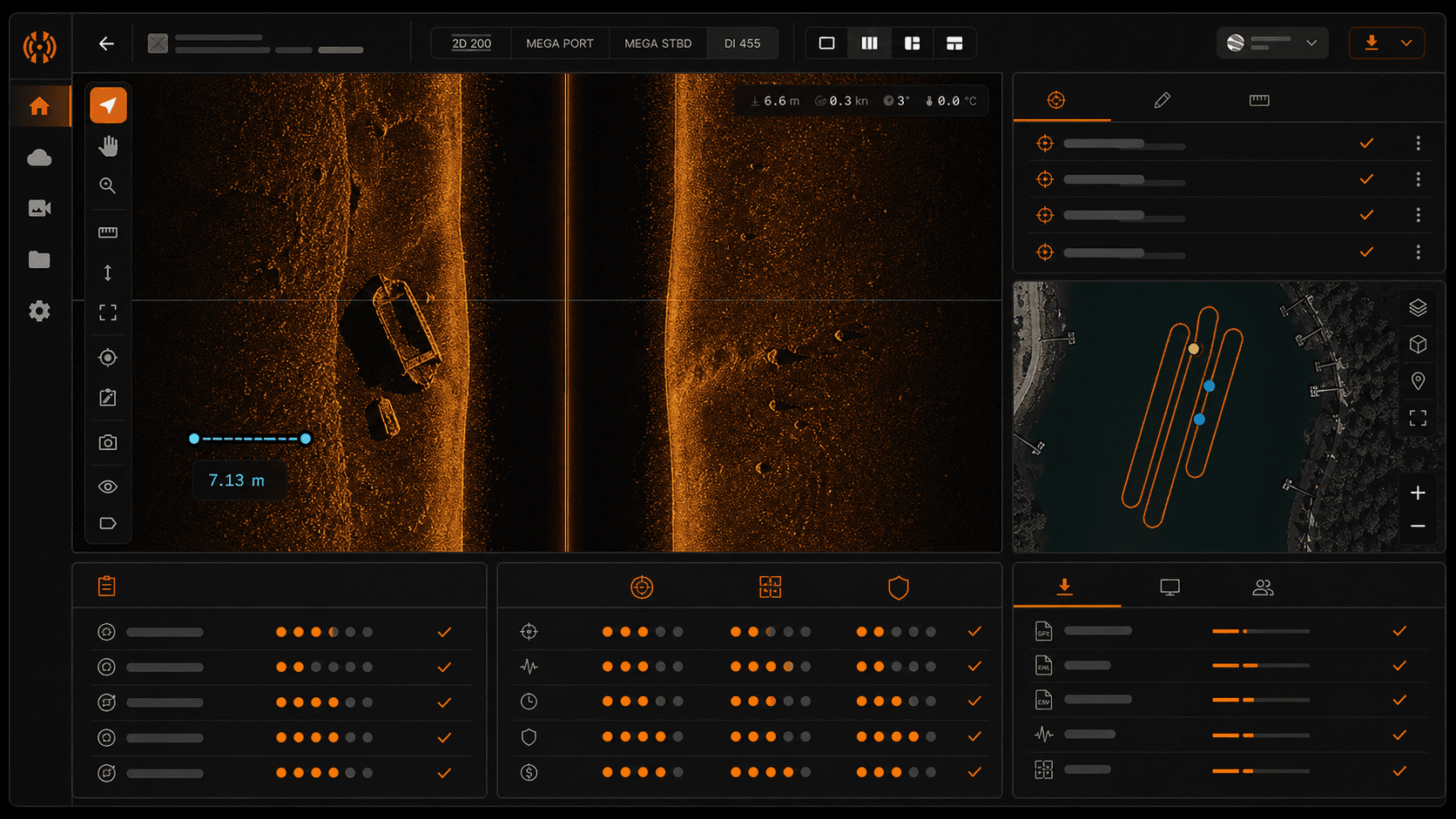
- Inspect 2D, Down Imaging, and separate port and starboard Side Imaging channels when those channels were recorded.
- Keep the playhead and ping position synchronized while switching views.
- Adjust the palette, sensitivity, contrast, and sharpness without changing the source recording.
- Mark a contact with its ping number, depth, coordinates, confidence, measurements, and notes.
- Measure an object's apparent size and estimate height from a clear acoustic shadow.
- Compare the contact with the recorded GPS track and export contacts with the track in KML.
The first-recording guide covers the import step. For a closer look at the role of each channel, see Side Imaging vs. Down Imaging vs. 2D sonar.
Training remains part of the equipment
Target interpretation improves through repeated work with known objects, varied bottoms, different ranges, and imperfect passes. The U.S. Coast Guard's instructional record on underwater search using side-scan sonar includes an automobile among its interpretation targets. Its purpose was to teach both broad-area search methods and objective reading of sonar images.
Dive Rescue International offers Humminbird-specific instruction for law enforcement, fire, and water-rescue teams. Its course covers setup, use, limitations, and the image-interpretation skills shared with traditional side-scan systems. That is a useful reality check for any department buying hardware. The transducer, installation, recording procedure, boat handling, search pattern, data review, and team handoff function as one system. Weakness in any part affects the result.
Departments should train with their own boat and waterways, then write a procedure that covers recording, file custody, review, target labeling, position checks, second-pass requests, and operational confirmation.
A practical answer for departments
A Humminbird Side Imaging unit can be a reasonable search tool when the department already owns compatible equipment, understands its coverage, records complete data, and trains operators to interpret it. It is especially useful when a team needs a portable way to scan bottom beyond the boat's centerline and revisit the pass at a workstation.
It should be evaluated as part of a search process, not by the sharpest screenshot produced during a demonstration. Test whether the installed system can record a known target, preserve usable GPS data, and let another trained reviewer find the same contact without coaching.
HumVision handles the review stage for recorded Humminbird data on Windows and macOS. It does not connect to the fish finder for live sonar, and it does not support Lowrance or Garmin recording formats. Start a trial when you have a real Humminbird recording ready to inspect.
Frequently asked questions
Can a Humminbird find a submerged vehicle?
A compatible Side Imaging unit can produce a return from a submerged vehicle when the target falls inside the recorded swath and the conditions support a readable image. The result may show vehicle-scale geometry and a shadow, but the strength and clarity vary with orientation, range, bottom type, burial, transducer setup, and boat motion.
Can sonar confirm that a contact is a person?
Sonar can reveal a target with dimensions and acoustic features that deserve further inspection. It cannot establish a person's identity. Teams should use their trained confirmation process and describe the sonar finding without overstating it.
Does HumVision connect to a Humminbird unit during a search?
No. HumVision reviews recordings after they have been saved by the Humminbird unit and copied from the SD card. It is a desktop review application, not a live sonar display.
Does HumVision alter the original recording?
The review tools work from the recorded sonar data. Contacts and review details are stored separately from the raw channel files, so the original .DAT, .SON, and .IDX data remains available.
In This Article
Share
30-day free trial
Try HumVision Team
Real recording. Real case. 30 days. No charge if it doesn't fit.
Start your free trial