Choosing Sonar Review Software for SAR and Dive Recovery Teams
How SAR coordinators, dive team leads, and fire-rescue captains can choose the right sonar review software — a buyer's framework keyed to team size and case workflow.
The real choice in front of you
You have a Humminbird unit on the boat. Maybe a Helix 9 from 2019 that still earns its keep, maybe a Solix 12 with MEGA Side Imaging, maybe both depending on which truck got hooked up that morning. The recordings are stacking up. After the last call, your sergeant asked why it took four hours to review a single pass, and you did not have a good answer beyond "the software."
This is the evaluation decision most water-rescue and dive recovery leads are quietly walking into. It is not about whether sonar review software is worth it. The recordings exist whether or not you review them well. The question is which sonar review software for SAR teams actually fits the way your unit works, and how to defend that choice to whoever signs the purchase order.
What follows is a buyer's framework. It is opinionated because we make one of the tools you might buy, and we will say so directly when we are talking about HumVision. We will also tell you when something is a general principle that applies to any vendor. If you walk away choosing a competitor because the fit is better, that is a win for the missing person you are trying to find.
What "sonar review software" actually has to do
There are five jobs the software has to do for a SAR or dive recovery workflow. Anything beyond these is nice. Anything missing from these is a problem.
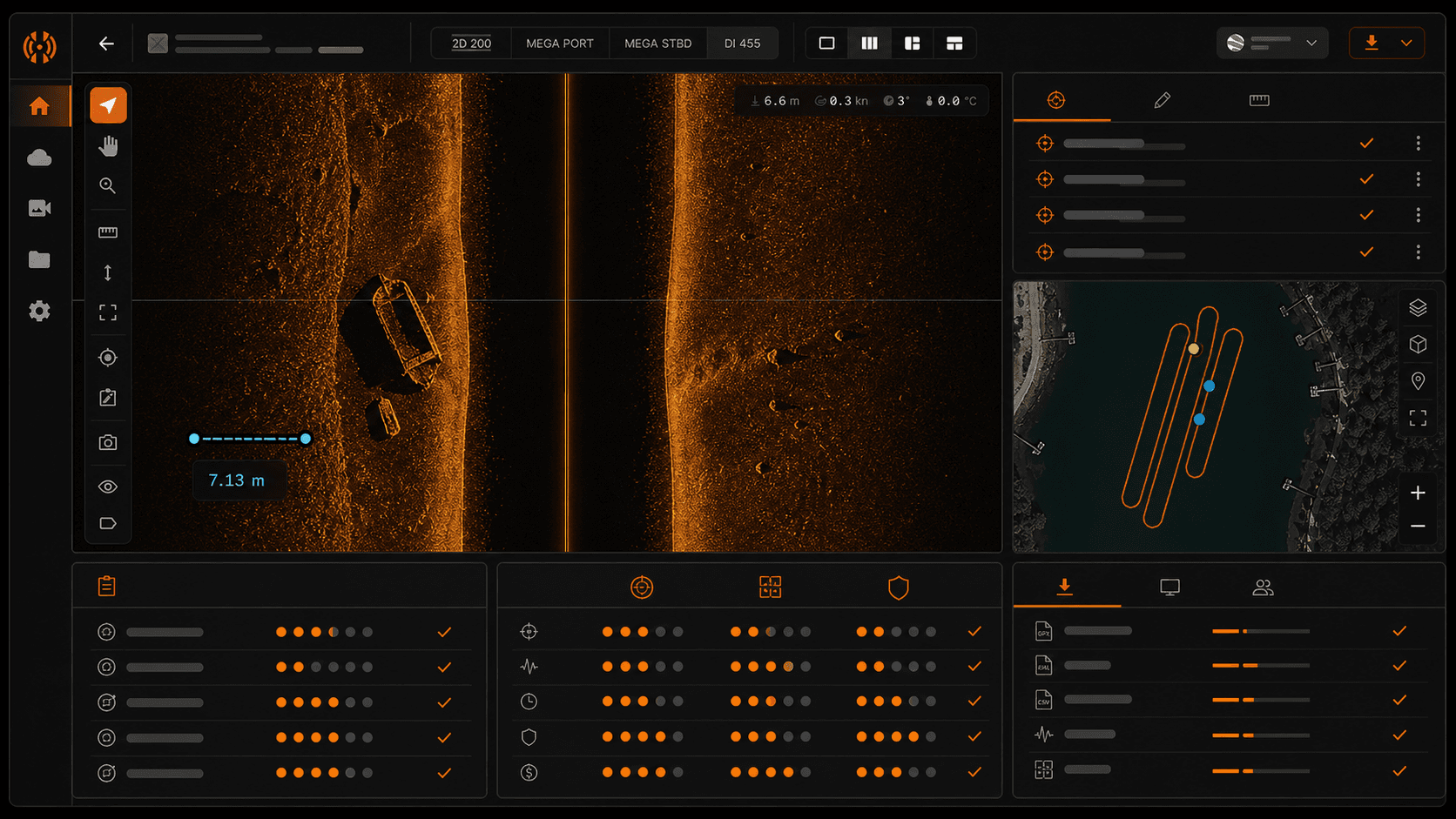
1. Channel viewing. The recording from a Humminbird unit holds multiple channels: 2D sonar, Down Imaging, Side Imaging, and on MEGA-capable units, the MEGA channels. Good software shows them at once, locked to the same time cursor, so you can see what 2D shows underneath a Side Imaging shadow without flipping windows.
- Lock all channels to one playhead, not separate timelines.
- Let you isolate one channel full-screen without losing position.
- Show port and starboard returns side-by-side with the boat track centered.
2. Contact marking and annotations. A contact is anything you flag for a diver, a follow-up pass, or a case file. The software has to let you mark it fast, label it, and find it again two weeks later when the case reopens.
- One-keystroke marking while playback runs.
- Notes that survive export.
- A contact list that filters by tag, time, or operator.
3. GPS handling. Humminbird GPS data inside .son and .dat files is noisy. The track jumps. Without smoothing, your mosaic stretches and contacts land in the wrong spot. Good software smooths the track without rewriting your raw data, ideally with a two-pass approach so you can compare before and after.
4. Mosaic generation. Stitching multiple passes into a single image of the search area is what turns sonar into a map. The mosaic is what you hand the dive team. It is what goes in the case file. If the software cannot produce a clean mosaic with proper geo-referencing, the rest of the features do not matter.
5. Export. The output has to leave the tool in formats other people use. KML for Google Earth, CSV for the contact list, image exports for the report, raw ping data if a forensic analyst asks for it. If exports are locked behind a higher tier or a proprietary format, the software is a dead end.
That is the job. Five things, done well. Anything a vendor adds on top is bonus, not substitute.
The three sizes of team, and why pricing follows team shape
Most sonar review software is priced like consumer fishing software: a single license, a single user, an annual subscription that scales with seats. That model breaks for SAR and dive recovery because the people on the boat are not the people writing the grant.
Volunteer SAR units have rotating rosters. A 10-person dive team might have 4 active operators this quarter and 8 next quarter after the new recruits finish open-water certification. Fire-rescue water divisions might span three stations with different captains. Per-seat pricing punishes growth, and roster volatility makes annual renewals ugly when finance asks why the line item changed.
Flat pricing solves this. One number per year, regardless of how many people log in. Grant writers love it because the line item does not move. Treasurers love it because the renewal forecast is a single multiplication. This is why HumVision sells in three flat tiers keyed to team shape, not seat count.
- Individual operator: one person, their own gear, their own cases.
- Single unit: one SAR team, one dive squad, one water-rescue crew that works together on shared cases.
- Full department: multiple units under one agency, often across stations.
The pricing follows the shape. Here is what each tier is and who it is for.
HumVision Pro — $99 one-time
Pro is for the individual operator. The volunteer who runs sonar on personal time. The captain who wants to evaluate the tool on a department-owned unit before bringing a purchase request to the chief. The retired diver who consults on cold cases and processes recordings for several agencies.
What is included: the full HumVision desktop application on Windows 10/11 or macOS Apple Silicon (beta), all five jobs above, all export formats, offline operation, and auto-updates for the life of the version. No subscription. 30-day free trial, then $99 one-time.
Constraints worth knowing up front: Pro activates on up to two computers for the same operator (a workstation and a field laptop, for example). It does not include shared workspaces, and the license is not transferable between people. If you are evaluating for a team, Pro is the wrong tier; Team is. If you are evaluating for yourself, Pro is the entire product at a price most people can expense without a meeting.
The most common Pro use case we see: a captain or sergeant downloading HumVision on a personal laptop, processing two or three old cases on their own time, and using the resulting case files to make the argument internally for a Team license. We built Pro at $99 because that is the kind of decision that should not require a budget cycle.
Try HumVision Pro free for 30 days
HumVision Team — $199 per year, flat
Team is for the single operating unit. One county dive squad. One volunteer SAR organization. One fire-rescue water division. Up to 10 operators, one shared workspace — 30-day free trial, then $199 per year flat. Not per seat, not per case, not per recording.
The feature that matters in Team is the shared workspace with live annotation sync. In practice this means: operator A starts reviewing the morning's recording at the staging area. Operator B picks up the same recording from the station two hours later to verify a contact A flagged. Both operators see the same contact list, the same notes, the same mosaic. Nobody is emailing screenshots. Nobody is asking "which version of the file are you looking at?"
This matters most during active cases where the recording handoff is the bottleneck. A drowning victim case where the dive team has a four-hour window of useful light. A missing-person case where the family is waiting for an update. The handoff between the operator who collected the data and the operator who reviews it has to be measured in minutes, not in the time it takes to upload to a shared drive.
Team also covers the realistic roster math. If your unit has 7 active operators today and 9 next year, the price does not change. If a new volunteer finishes training, you do not file a license change request. Up to 10 operators, flat.
If your unit is bigger than 10 operators or spans multiple stations under one agency, you want Department.
Try HumVision Team free for 30 days
HumVision Department — $499 per year, flat
Department is for the agency, not the unit. A fire-rescue department with three stations and a water-rescue capability at each. A sheriff's office with a dive team, a marine patrol unit, and a search-and-rescue volunteer arm that shares equipment. A state-level SAR coordinating body with field teams across counties.
What you get at the Department tier: unlimited operators across the agency, a department-wide workspace, and custom branding so case files and exports carry the agency's identity instead of ours. 30-day free trial, then $499 per year flat across the entire agency. There is no seat count to police, no internal recharge to figure out, no "which station owns the license."
The custom branding piece sounds cosmetic until you watch a chief hand a printed case mosaic to a county commissioner. The agency name on the export matters. It is the difference between "the software made this" and "we made this."
Department is also the tier most grant-funded agencies end up at, because the budget math is cleaner. One line item, one renewal, covers everything water-rescue across the whole organization. We have seen departments that previously bought five Pro-equivalent licenses across stations consolidate to one Department license and cut the per-year cost in half while gaining unlimited seats.
Try HumVision Department free for 30 days
The questions worth asking any sonar review vendor, including us
If you are evaluating side imaging sonar software for search and rescue, here is the checklist we would hand a peer. Ask these of every vendor, ours included. The answers tell you whether the tool is built for your work or borrowed from a fishing product.
1. What file formats does it read natively? HumVision reads .son, .dat, and .idx from Humminbird Helix, Solix, and MEGA units. If a vendor lists "all major formats" without naming extensions, that is a flag. Ask which firmware versions they have tested against.
2. Does it work offline? Cell coverage on a boat ramp is unreliable. Cell coverage at a remote impoundment is non-existent. If the software needs a cloud connection to open a recording, it is not built for field work. HumVision runs fully offline by design.
3. How does it handle GPS smoothing? Ask for specifics. "We smooth the track" is not an answer. "We do a two-pass smoothing that preserves raw data and exposes the smoothed track separately" is. If a vendor cannot describe their approach, they probably do not have one.
4. What does export actually include? Get a list. CSV of contacts, KML, image exports, mosaics, raw pings, Google Earth overlays. All of these should be standard, not premium add-ons. If exports are locked behind upgrades, you do not own your case data.
5. What is the update model? Are updates included for the life of the version, or do they expire? HumVision Pro is one-time with auto-updates for that version. Team and Department include updates as part of the annual price. There is no "maintenance fee" extra.
6. What is the trial and refund policy? HumVision offers a 30-day free trial across all tiers. Process a real case during that window. If the tool does not earn its place, walk away with no charge. If a vendor cannot stand behind a trial window, ask why.
We do not publish a fixed time-savings multiplier because every recording is different, and we would rather you measure it on your own first case. That is also a fair question to ask any vendor, and a fair answer to expect.
Where to go from here
If you are evaluating the tool yourself, start a free trial on Pro. If your unit is evaluating together, Team is the tier. If the evaluation is going through the agency, Department is built for that shape.
Every tier includes a 30-day free trial. Process a real recording from a real case. If HumVision does not earn its place in the workflow, walk away — no charge. Built for the teams who bring people home.
Frequently asked questions
Can I switch tiers later?
Yes. If you start on Pro and your unit decides to standardize on HumVision, the Pro purchase price is credited against the first year of Team or Department. Same applies moving from Team to Department as an agency grows. Email hello@gethumvision.com and we will handle the upgrade manually so nothing breaks mid-case.
Do you support Lowrance or Garmin recordings?
No, and that is by design. HumVision reads Humminbird .son, .dat, and .idx files from Helix, Solix, and MEGA units. We chose to build deep on one format rather than shallow across three, because the parsing work for accurate mosaics and contact geo-referencing is format-specific. If your team runs Lowrance or Garmin primarily, HumVision is not the right tool. Use ReefMaster or SonarTRX instead.
What if our agency needs a free trial before committing?
Every tier includes a 30-day free trial. Process real case data during those 30 days; if HumVision does not earn its place in the workflow, walk away with no charge. We use a real-recording trial rather than a demo-data trial because real evaluation happens on real cases.
Is there a discount for volunteer organizations?
Probably yes. Volunteer SAR units, all-volunteer dive teams, and registered nonprofits should email hello@gethumvision.com with a short note about the organization. We handle these case-by-case rather than publishing a code, because the situations vary and we would rather have a short conversation than a generic discount.
In This Article
Share
Try HumVision Team
Real recording. Real case. 30 days. No charge if it doesn't fit.
Start your free trialMore from the workbench
Jul 13, 2026 · 7 min read
Humminbird
Can a Humminbird Fish Finder Be Used for Underwater Search and Recovery?
A practical look at when Humminbird Side Imaging fits an underwater search, what the recording can show, and where training and target confirmation still matter.
Jul 13, 2026 · 9 min read
Target Verification
How to Verify a Suspected Sonar Target Before Sending Divers
A review procedure for checking a suspected sonar contact across channels, measurements, GPS data, repeat passes, and the operational handoff.
Jul 13, 2026 · 9 min read
Side Imaging
What Submerged Vehicles Look Like on Side-Imaging Sonar
How vehicle geometry, orientation, acoustic shadows, bottom type, and partial burial affect a side-imaging sonar return during underwater search and recovery.