Why GPS Stairstepping Ruins Side Imaging Reviews — and How to Fix It
Humminbird side imaging recordings show GPS stairstepping at slow speeds, which throws off mosaics, contact coordinates, and pass coverage. Here is what causes it and how a two-pass smoothing approach fixes it.
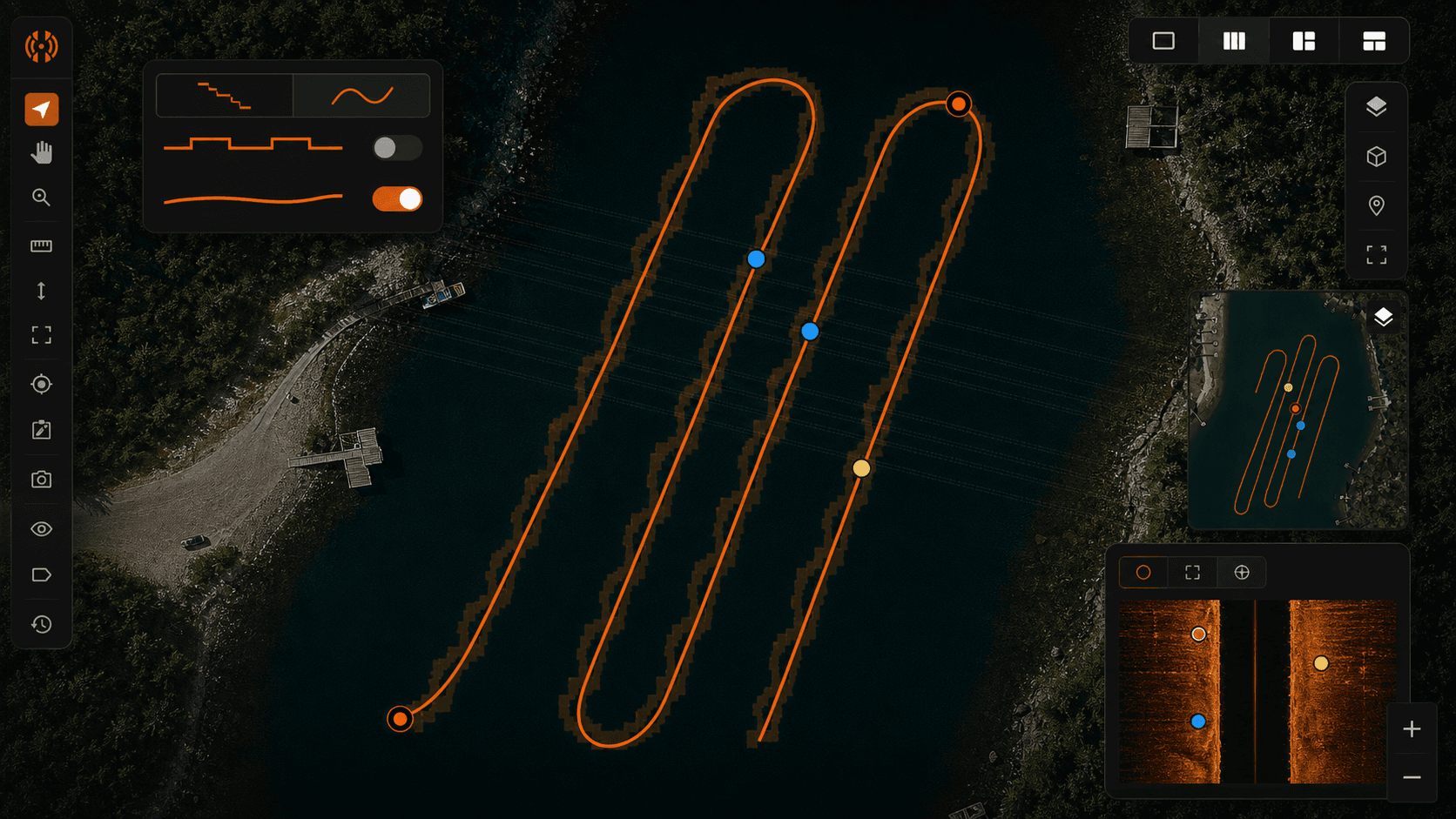
You finish a slow search pass over a drop-off, pull the SD card, and load the recording into whatever tool you use to look at side imaging. The waterfall looks clean. The targets are where you expected them. Then you export the GPS track to Google Earth and the line you ran looks like a flight of stairs. Diagonal jogs. Right angles where the boat clearly never turned. Clusters of pings stacked on top of each other, then a sudden jump three meters east, then another cluster.
That is humminbird GPS stairstepping, and once you start noticing it you cannot unsee it. It shows up worst on the kind of slow, deliberate passes that recovery work demands. If you have ever tried to hand a KML to a dive team and watched them squint at the screen trying to figure out whether the track was real, you already know the problem. The data is mostly right. It is just presented in a way that makes it look wrong, and in a few cases makes it actually wrong in ways that matter.
This post walks through what causes the staircase, why it matters for a case, what the common fixes get wrong, and how a two-pass smoothing approach handles it without lying about what the GPS actually saw.
What stairstepping looks like in your recording
Pull up a recent slow pass in Google Earth or any GIS tool. If you were moving under 2 mph and your unit was a Helix, Solix, or any MEGA-equipped rig, you are probably looking at a track that resembles a pixelated diagonal. The line does not curve. It jogs. Short horizontal runs, then a vertical step, then another short run, then another step. The whole thing forms a staircase tilted in the direction you were heading.
Zoom in further and the structure gets clearer. Each "tread" of the staircase is a cluster of multiple pings sharing the exact same latitude and longitude. The "riser" is a single jump to a new coordinate, where the next cluster of pings sits. The faster you were going, the longer the treads. The slower you were going, the more pings pile up on each tread and the more obvious the artifact becomes.
This is not a defect in your unit. Every Humminbird I have looked at recordings from does this, and the units that compete with Humminbird have their own version of the same behavior. It is a consequence of how the data gets written.
Why it happens — GPS sampling rate vs. sonar ping rate
Humminbird units sample GPS at roughly 1 Hz. One fix per second. Sonar pings, depending on your range setting and which channels you have running, come in much faster: several per second on each side at typical recovery ranges. When the recording layer goes to write a ping, it needs to stamp it with a position. It only has a new GPS fix once per second, so for the pings that arrive between fixes it does one of two things: it repeats the last known fix, or it dead-reckons a position from the last fix plus elapsed time and the unit's idea of your heading and speed.
In practice, most Humminbird firmware just repeats the last fix until a new one arrives. That is where the clusters come from. Every ping captured during that one-second window gets written with identical coordinates. Then a new fix lands, the unit jumps to it, and the next batch of pings sits on the new coordinate. Repeat.
The kicker is the speed dependency. At 5 mph you are covering about 2.2 meters per second, which is bigger than typical GPS noise, so the staircase looks like a reasonably smooth line with small steps. At 1.5 mph you are covering roughly 0.67 meters per second, which is smaller than typical GPS noise (commonly 2–4 meters horizontal error in normal conditions). Now the steps are large relative to the actual distance traveled, and the staircase becomes obvious. Recovery passes live in that slow zone by design. You are looking, not driving.
Why it actually matters for a recovery case
The staircase has real consequences when you are working a scene.
Mosaic generation suffers first. When the stitcher tries to align overlapping passes into a single image, it uses the GPS track to know where each swath belongs. Quantized positions produce visible seams, banding, and misregistered targets where the same object appears twice a few meters apart because two adjacent passes disagreed about where the boat was.
Contact coordinates drift. If you flag a target on a slow pass and the system uses the raw GPS fix associated with that ping, you can be off by 5 to 15 meters depending on speed, sky view, and which fix happened to be active when the ping was recorded. On a 30-meter recovery scene that is enough to send divers to the wrong side of a feature.
KML and Google Earth handoffs erode trust. Incident command opens your file, sees a track that visibly does not match the path the boat took, and starts questioning everything else in the package. You then spend the next ten minutes explaining a firmware quirk instead of the actual coverage of the search.
Pass coverage maps under-report what you covered. If your coverage tool buffers the GPS track to estimate swath width, a staircase track produces a notched buffer with gaps that were not actually gaps on the water. You end up either re-running areas you already cleared or signing off on coverage you cannot defend.
What people do today — and why most of it is wrong
The common workarounds all have costs.
Manually editing the .gpx in QGIS or a text editor is the most popular approach I see. It works in the sense that you can produce a prettier line, but it is slow, it is not reproducible, and you are now making up coordinates with your eyeballs. If anyone asks how you arrived at the smoothed track, the honest answer is "I drew it." That is not a great answer in a courtroom or an after-action review.
Throwing the whole pass out is the conservative move. If the GPS looks bad, do not trust the data, run it again. This is fine if you have the time and the fuel. On a fading-light recovery or a multi-day search with limited boat hours, it is expensive and often unnecessary because the underlying sonar data is fine.
Using a single GPS fix as the contact location and accepting the error is the third option. It is honest about uncertainty but it bakes in a 5–15 meter ambiguity that you did not have to accept. The sonar data has enough information to do better.
None of these address the actual problem, which is that the ping-to-position mapping is wrong in a recoverable way. The pings happened at specific times. The boat was at specific places at those times. We have enough information to reconstruct the mapping more accurately than the firmware did.
The two-pass smoothing approach
HumVision's track smoother runs in two passes, and the design choices matter.
Pass one interpolates intermediate positions between consecutive GPS fixes. It uses the timestamp on each ping, the unit's recorded heading, and the ping cadence to estimate where the boat actually was when each ping was captured. The simplest version of this is linear interpolation between fixes, but heading and cadence let us do better than a straight chord — if the boat was curving, the interpolated path curves too. This pass alone removes the cluster-and-jump structure and gives you a continuous track instead of a quantized one.
Pass two applies a constrained smoothing kernel. The constraint is what matters. The kernel is not allowed to pull the track away from the original GPS fix points beyond a tolerance you can set. This means the smoothed track still passes through (or very near) the actual positions the GPS reported. We are removing dead-reckoning quantization, not inventing a new path. If the GPS said the boat was at a particular coordinate at second 47, the smoothed track is still at that coordinate at second 47. The pings between second 47 and second 48 are what get redistributed.
Now the honest part. This approach cannot recover information the GPS never sampled. If you went around a buoy between two fixes and the GPS only saw the entry and exit positions, the smoothed track will cut the corner just like the raw interpolation would. There is no way around that without an external position source. The smoother makes the track look like the boat moved at constant heading and speed between fixes, because that is the best assumption available from the data we have. For recovery passes, where the boat is usually moving in a deliberate straight line or a slow gentle curve, this assumption is close enough to reality to matter. For a tight slalom through structure, it is not.
If you want to dig into how this fits into a broader workflow, the buyer's guide for SAR teams covers the rest of the review pipeline.
What to expect when you run it on your recordings
The operation is fast. On a typical hour-long recovery recording, smoothing finishes in under a minute on a recent laptop. The before-and-after view shows the raw staircase track and the smoothed track overlaid on the same map, so you can see exactly what changed before you commit.
Contact accuracy improves measurably on slow passes. I am not going to put a specific meter number on it because the honest answer depends on your boat speed, your GPS quality, your sky view, and how aggressively you set the smoothing constraint. On a clean 1.5 mph pass with a normal sky view, the improvement is large enough to matter for diver placement. On a 5 mph pass with a partially obstructed sky, the improvement is smaller because the raw track was already closer to correct.
Mosaics align better. The seam artifacts where adjacent passes disagreed about position mostly go away, because both passes are now using continuous interpolated tracks instead of quantized ones. KML exports look like a boat actually drove them.
When NOT to use the smoother
If you have a clean, fast pass with strong GPS lock, the raw track may already be good enough. Above about 4 mph in open water with a clear sky, the staircase is small enough relative to the noise floor that smoothing will not visibly change anything. It will not hurt. The constraint keeps you close to the original fixes, but it will not help either. Save the step.
If you are working from a recording where the GPS was clearly dropping fixes (long gaps where the unit was running on stale positions), be cautious. The smoother will interpolate across those gaps, and the interpolated section is only as good as the assumption that the boat held a constant heading. If you know the boat turned in that gap, the smoothed track is wrong in the gap. The raw track was also wrong, just differently. Pull up the heading log and decide which kind of wrong you can defend.
If you are documenting the raw data for an evidence package and the question is "what did the unit record," keep the raw track in the package alongside the smoothed one. Do not replace it. The smoothed track is an analysis product. The raw track is the source record.
Try it on a real pass
The fastest way to know whether this matters for your work is to run it on a recording you already have an opinion about. Load a slow pass where you remember the GPS looking bad. Run the smoother. Look at the before-and-after on the same map. If the difference is meaningful for your use case, the Pro tier is a one-time $99 license for a single operator. The 30-day free trial means the test on your own recordings is the actual evaluation, not anything written on a sales page.
Sonar analysis, finally made modern. Recovery work happens at lakes with no service, so the full analysis runs on your machine with the network off.
Does this work with MEGA Side Imaging?
Yes. The GPS sampling behavior is a function of the head unit, not the imaging channel. MEGA, standard side imaging, down imaging, and 2D all share the same position log, so the smoother applies to all of them. If your recording has a .DAT file with GPS data and .SON files with pings, the workflow is the same.
Can I export the smoothed track as a KML?
Yes. KML and GPX are both supported, along with CSV for the raw coordinate list if you want to pull it into QGIS or another GIS tool. The export includes the smoothed track as the primary line and optionally the original GPS fixes as point markers, so a reviewer can see both layers in one file.
Will my original recording be modified?
No. Smoothing happens at the project layer inside HumVision. The .DAT, .SON, and .IDX files on your SD card or in your archive are never touched. If you ever need to go back to the raw track, it is one click away inside the project, and the source recording on disk is byte-for-byte what came off the unit.
In This Article
Share
Try HumVision Pro
Real recording. Real case. 30 days. No charge if it doesn't fit.
Start your free trialMore from the workbench
Jul 13, 2026 · 7 min read
Humminbird
Can a Humminbird Fish Finder Be Used for Underwater Search and Recovery?
A practical look at when Humminbird Side Imaging fits an underwater search, what the recording can show, and where training and target confirmation still matter.
Jul 13, 2026 · 9 min read
Target Verification
How to Verify a Suspected Sonar Target Before Sending Divers
A review procedure for checking a suspected sonar contact across channels, measurements, GPS data, repeat passes, and the operational handoff.
Jul 13, 2026 · 9 min read
Side Imaging
What Submerged Vehicles Look Like on Side-Imaging Sonar
How vehicle geometry, orientation, acoustic shadows, bottom type, and partial burial affect a side-imaging sonar return during underwater search and recovery.