Replacing a Three-Tool Sonar Review Workflow With One Workbench
Most SAR and dive recovery teams review Humminbird recordings across three separate tools — a vendor scrubber, a spreadsheet for contacts, and Google Earth for maps. Here is what that workflow actually costs and how a single workbench changes the math.
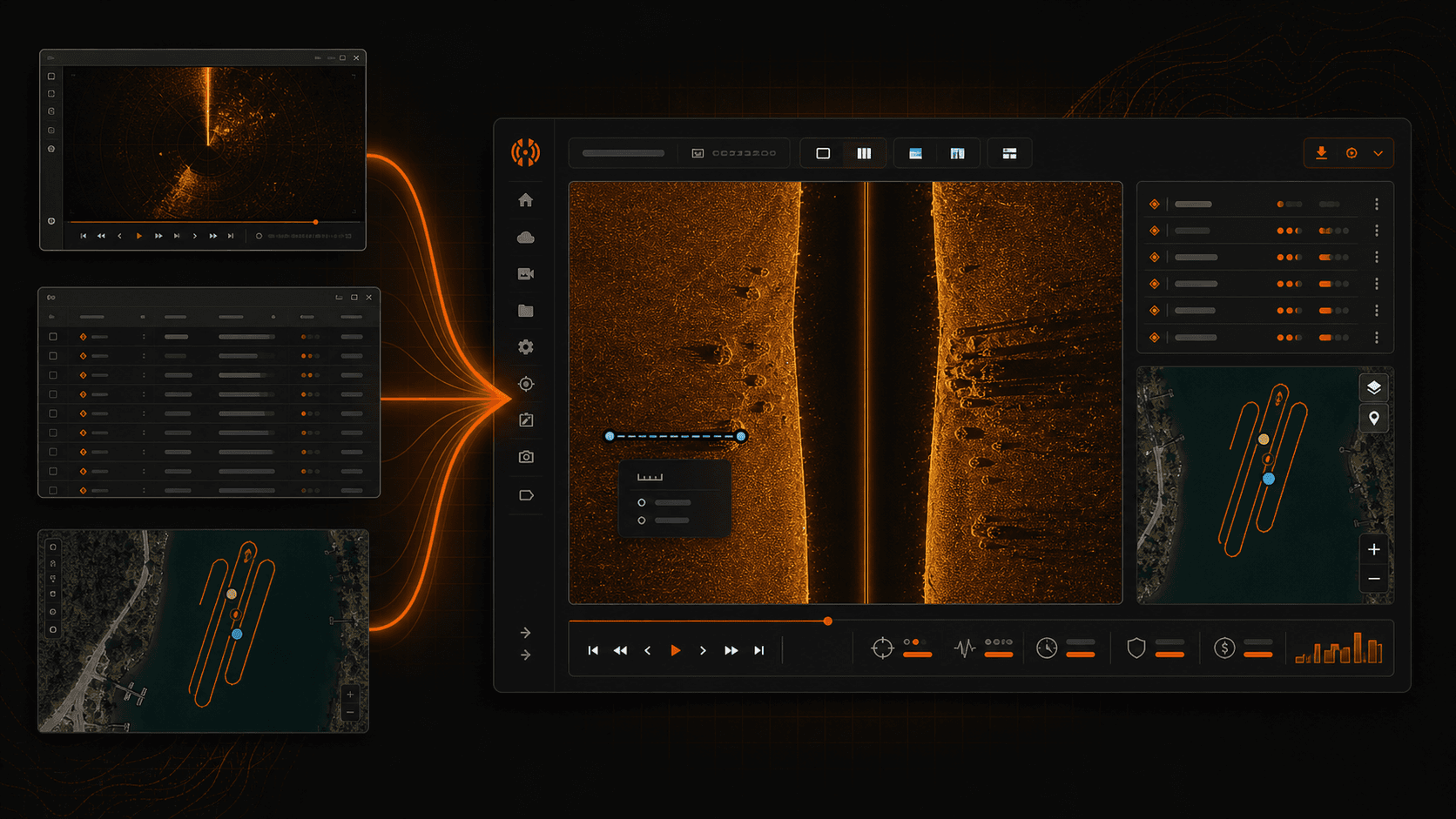
If your side imaging review workflow looks like most volunteer SAR and dive recovery teams we talk to, it runs across three pieces of software that were never meant to talk to each other. You scrub the recording in one tool. You track contacts in a spreadsheet or a Notes file. You move the coordinates over to Google Earth so the dive team can see them. That stack works. Plenty of recoveries have come out of it. But it leaks time on every pass, and the leak gets worse the more operators you add to the case.
This post is a process diagnosis first and a product pitch second. If you read it and decide your current stack is fine, that is a fair outcome. The teams who get the most out of a single workbench are the ones running multiple cases a month or handing off recordings between operators, and the math below will make it clear why.
The three-tool reality most teams run today
The standard side imaging review workflow on a volunteer or municipal team usually looks like this. Humminbird PC, SonarTRX, or ReefMaster handles the scrubbing, opening the .son and .dat files off the SD card, stepping through the side imaging channel, eyeballing returns. A spreadsheet, a paper notebook, or a Notes app tracks contacts by ping number, depth, and a guess at lat/lon. Google Earth or QGIS handles the map view so incident command and the dive team can see where the operator wants eyes underwater.
That is not a strawman. It is the actual stack on actual laptops at actual launches. Each of those tools is good at the one job it was built for. Humminbird PC reads native Humminbird files. ReefMaster does competent mosaic work. Google Earth is universal. Nobody picked badly. The friction is not in any one tool. It is in the gaps between them.
Where the time actually goes (and it is not where you'd guess)
The first time we sat down with a stopwatch and timed a real review, the result surprised the operator more than it surprised us. He guessed the slow part was scrubbing. It was not. Scrubbing was the fast part. The slow parts were everywhere the data crossed a tool boundary.
Re-finding a contact after switching tools costs three to five minutes every time. You marked something at minute 22 of the recording, alt-tabbed to the spreadsheet to type the coordinates, then alt-tabbed back and lost your scroll position in the sonar track. Multiply by the dozens of times that happens on a single pass.
Mismatched coordinate systems eat another chunk. The scrubbing tool reports one format, the spreadsheet stores another, and Google Earth wants a third. Most operators end up keeping a conversion calculator open in a fourth window. When the coordinates are slightly wrong, the dive team finds out at the dive site, which is the worst place to find out.
Re-exporting after edits is the quiet killer. You mark contact number 5 and realize contact number 2 needs to move thirty feet. In a read-only export pipeline, that means re-running the whole export, re-importing into Google Earth, and re-sending the file. On a Friday-night call-out, that gets skipped, and the dive team works off an outdated KML.
Briefing the next operator is its own time sink. If you have to hand the case to a fresh set of eyes at 2 a.m., walking them through your spreadsheet of contacts and your tool chain takes thirty to forty minutes before they can do useful work. Most of that is teaching them where you put things, not what you found.
Mosaic generation pulls in yet another piece of software. ReefMaster or a free mosaic tool, another set of import settings, another export step, another file format to keep track of. By the time you have a mosaic you can show command staff, you have touched four applications.
What "one workbench" actually means
HumVision is a single desktop application that handles the whole humminbird side imaging workflow inside one project. You drag the .son, .dat, and .idx files in. You scrub the down imaging, side imaging, and 2D channels. You mark contacts directly on the sonar view, and they show up on the GPS map in the same window. The GPS track auto-smooths so the contacts do not stairstep across the bottom. You generate the mosaic in the same project. You export KML, CSV, and contact images for the dive team.
None of those steps requires leaving the app. The contact you marked on the sonar view is the same contact on the GPS map is the same contact in the KML export. There is no copy step, no re-typing of coordinates, no second tool open in the background.
The phrase that matters here is "without leaving the app." It sounds small. It is not. Every tool boundary you remove takes a category of error and a category of wasted time off the case.
The collaboration step most teams skip
Single-operator workflows hide the cost of handoff because there is no handoff. The moment a second person needs to look at the recording, the friction shows up.
The current options are not good. Email the .son file and hope the other operator has the same scrubbing tool installed on the same version with the same view settings. Screen-share over a phone call and narrate where the contacts are. Send the spreadsheet of coordinates and have them re-mark from scratch on their own machine. Or wait until the original operator is back at the station and let them do the briefing in person.
The Team tier in HumVision is built around a shared workspace. Two operators on different computers open the same project. Contacts and annotations sync live. When operator A marks a contact, operator B sees it appear within a few seconds. Projects are organized by case, not by which laptop they live on, which means the second-shift operator opens the same case file the first-shift operator was working in.
That collaboration step is the one most teams skip because the current tooling makes it painful. Once it stops being painful, you stop skipping it, and the case gets two sets of eyes instead of one.
A real pass, end to end
Here is what a search and rescue sonar review process looks like with the consolidated workflow on a typical call-out.
The boat returns to the launch at 9:15 p.m. with a 45-minute recording from a grid pass over the suspected entry point. The operator pulls the SD card, walks to the truck, opens the laptop. He drags the .son file into HumVision. The project opens with the side imaging channel ready to scrub.
He scrubs the recording at roughly 3x speed, slowing down on three areas that catch his eye. He marks four contacts. The GPS track auto-smooths in the background, the same problem covered in the GPS stairstepping deep dive, and the smoothing happens without him having to think about it.
A second operator on the team, sitting at the station ten miles away on her own laptop, has the same shared project open. As the first operator marks contacts, they appear on her view. She is looking at the mosaic that generated automatically as the recording opened. She flags two of the four contacts as worth a closer look and adds a note on a third saying the return profile looks like submerged timber, not what they are looking for.
Thirty minutes after the recording came off the SD card, both operators have agreed on which two contacts warrant dive verification. The KML export takes about ten seconds. The first operator texts it to the dive team lead running incident command on the other side of the launch.
Total time from card pull to dive team handoff: under forty minutes. The same pass on a three-tool stack, in our experience and the operators we have timed, runs ninety minutes to two hours, mostly because of the handoff step. We do not publish a fixed multiplier because every recording is different, and we would rather you measure it on your own first case.
Why this is a Team-tier purchase, not a Pro stack
The math here is plain. Three operators each buying a Pro license is not the same product as one Team license. Pro does not share projects. Pro operators cannot see each other's contacts in real time. Pro is built for the single-operator workflow, and stacking three Pro licenses on top of each other does not produce a shared workspace — it produces three separate workspaces that have to be reconciled manually, which is exactly the problem you were trying to leave behind.
Team tier is the shared-project tier. One flat price of $199 per year covers up to ten operators on the same workspace. Grant writers and treasurers get one line item that does not change every time someone joins or leaves the roster. Add a new volunteer in March, and the budget does not move. Lose two operators to relocations in July, and the budget does not move.
For a team running more than one case a month, or any team that hands recordings between operators, Team is the version that matches how the work actually happens.
When the three-tool stack still wins
There are teams where the switch is not urgent. If you have one operator who runs every case, your team runs roughly one case a month, your existing tools are paid for, and nobody hands off recordings, the friction in the three-tool stack is real but small. The hours you would save are not enough to justify the learning curve of a new tool.
The teams who win clearly on the switch are the ones running multiple cases a month, the ones with rotating operator schedules, and the ones who currently brief incoming operators by walking them through a spreadsheet at 2 a.m. If that is your team, the math gets one-sided fast.
Try it on next week's pass
The honest evaluation is not a demo call. It is your next actual recording, run through the workbench, timed against what the same review would have taken on your current stack. The 30-day free trial is the evaluation window. If after a real case you decide the three-tool workflow served you better, walk away with no charge.
Start your free trial and run it on the next pass.
Can a 5-person volunteer team use Team tier?
Yes. Team supports up to ten operators on a single shared workspace, so a five-person team has room to grow into the tier without changing plans. The flat $199 per year does not scale with seat count up to that ceiling, which is the part that matters for volunteer budgets.
Do we lose our existing project history when switching?
HumVision projects start fresh. There is no automatic migration from Humminbird PC, SonarTRX, or ReefMaster project files. Your older .son and .dat recordings can be imported into a new HumVision project and re-marked, which most teams do for active cases only. Closed cases usually stay archived in whatever format they were in.
Does Team include the GPS smoothing and mosaic features?
Yes. All viewing and export features are identical across tiers, including GPS track smoothing, mosaic generation, contact marking on the sonar view, and KML export sonar workflow output. The tier differences are capacity (number of operators) and sharing (live annotation sync). Nothing about the review or export pipeline changes between Pro and Team.
In This Article
Share
Try HumVision Team
Real recording. Real case. 30 days. No charge if it doesn't fit.
Start your free trialMore from the workbench
Jul 13, 2026 · 7 min read
Humminbird
Can a Humminbird Fish Finder Be Used for Underwater Search and Recovery?
A practical look at when Humminbird Side Imaging fits an underwater search, what the recording can show, and where training and target confirmation still matter.
Jul 13, 2026 · 9 min read
Target Verification
How to Verify a Suspected Sonar Target Before Sending Divers
A review procedure for checking a suspected sonar contact across channels, measurements, GPS data, repeat passes, and the operational handoff.
Jul 13, 2026 · 9 min read
Side Imaging
What Submerged Vehicles Look Like on Side-Imaging Sonar
How vehicle geometry, orientation, acoustic shadows, bottom type, and partial burial affect a side-imaging sonar return during underwater search and recovery.